Google Ads for beginners: an Australian guide
A simple guide to Google Ads for Australian small businesses: how the auction works, keywords, match types, budgets, bidding, tracking and the mistakes to avoid.
Quick answer Google Ads lets your business show an ad at the top of Google when someone searches for what you sell. You choose the searches, you set a budget, and you usually pay only when someone clicks. Google runs a quick auction for every search and picks the ads to show based on your bid, the quality of your ad and page, and the search itself [1]. Done well, it brings calls and bookings within days. Done badly, it burns money fast. This guide explains every part step by step so you can start safely.
Key takeaways
- Google Ads is an auction, but the highest bid does not always win. Quality matters too [1].
- Start with a few tightly themed keywords and use phrase or exact match until you see real data [3].
- Add negative keywords from day one to block searches that will never buy [4].
- Set up conversion tracking before you spend real money. Without it you are guessing [5].
- Your daily budget is an average. Google can spend up to twice it on a busy day, but not more than about 30.4 times it in a month [6].
- Every claim in your ad must be true and provable under Australian Consumer Law [8].
What is Google Ads, in simple words?
Think of Google as a huge, busy shopping street. Every search is a person walking in and saying out loud what they want: "emergency plumber Adelaide", "accountant near me", "buy running shoes". Google Ads lets you put a sign in front of that person at the moment they ask.
There are a few kinds of Google Ads. Beginners should know three:
- Search ads. Text ads on the Google results page. They show when someone types words that match your keywords. This is where most small businesses should start, because the person is already looking for you.
- Display ads. Picture ads on other websites and apps. Good for reminding people about you, weaker for finding new customers who are ready to buy.
- Performance Max. An automated campaign type that uses Google's AI to place ads across Search, YouTube, Maps, Gmail and more. Powerful, but harder to control. I explain it in a separate guide.
This guide focuses on Search ads, because that is where a beginner gets the clearest results for the least risk.
Google Ads vs SEO: what's the difference?
SEO (search engine optimisation) is how you appear in the free results below the ads. It takes months to build but keeps working. Google Ads is paid and starts working almost straight away, but stops the moment you stop paying. Most healthy businesses use both. If you are new to SEO, start with my beginner's guide to choosing an SEO expert and my local SEO checklist for Google Business Profile, which is free visibility in Google Maps.
| Google Ads | SEO (organic) | |
|---|---|---|
| Cost | You pay per click | You pay in time or for help, not per click |
| Speed | Can show today | Usually months |
| When you stop | Traffic stops | Traffic usually continues for a while |
| Control | Choose exact searches, areas, hours | Google decides what ranks |
| Best for | Urgent services, new businesses, testing offers | Long-term, low-cost leads |
How does the Google Ads auction work?
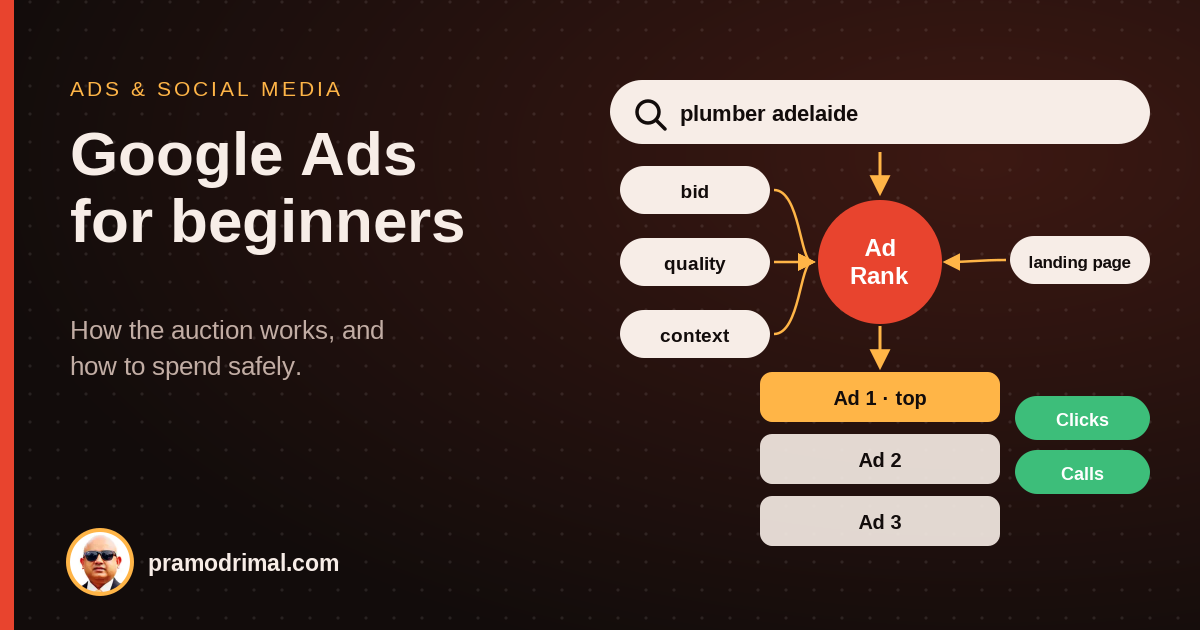
Every time someone searches, Google runs an auction in a fraction of a second. It does not simply sell the top spot to the highest bidder. Google says there are six main factors that decide which ads appear and in what order: your bid, the quality of your ads and landing page, the expected impact of ad assets (extras such as phone numbers and links), the Ad Rank thresholds (minimum quality levels), the context of the search (location, device, time) and how competitive the auction is [1].
Google combines these into a score called Ad Rank. Ad Rank is worked out twice in each auction: once to decide if your ad can show at all, and again to decide where it sits compared with other ads [2]. Because Ad Rank is recalculated on every search, your position can change from one search to the next [2].
Here is the part that surprises people: your bid is the most you are willing to pay, not what you will pay. Google says you often pay less than your maximum bid [1]. And higher-quality ads "can often lead to lower CPCs", where CPC means cost per click [2]. In plain words: a better ad and a better page can get you a higher spot for less money.
What is Quality Score?
Quality Score is a number from 1 to 10 that Google shows next to each keyword. It is built from three parts: expected click-through rate (how likely people are to click your ad), ad relevance (how well your ad matches the search) and landing page experience (how useful your page is after the click) [7]. Each part is rated "above average", "average" or "below average" compared with other advertisers who showed for the same searches over the last 90 days [7].
Google is clear that Quality Score is a diagnostic tool, not an input in the auction, and it is not a key performance indicator to chase [7]. Use it like a warning light on a car dashboard. A low score tells you where to look: the ad text, the keyword, or the page.
| Quality part | What it means | How to improve it |
|---|---|---|
| Expected click-through rate | Will people click? | Put the searcher's words and a clear benefit in the headline |
| Ad relevance | Does the ad match the search? | Keep each ad group to one tight theme |
| Landing page experience | Is the page useful after the click? | Send people to the matching service page, not your home page |
How is a Google Ads account organised?
A Google Ads account works like a filing cabinet with three drawers inside each other:
- Account – your login, billing and users.
- Campaigns – each campaign has its own budget, location, schedule and bidding. Make one campaign per service or per goal.
- Ad groups – inside each campaign, ad groups hold a small set of closely related keywords and the ads that match them.
A simple rule: if two keywords need a different ad or a different page, they belong in different ad groups. "Heat pump hot water" and "gas hot water system" should not share an ad, because the person wants different things.
How do you choose keywords?
A keyword is the word or phrase you want your ad to show for. Start from your customer's head, not your own. What would a stressed person type at 10 pm when their hot water dies? Probably "hot water not working" or "hot water repair near me", not "domestic water heating solutions".
Good beginner keywords:
- name a service ("blocked drain plumber"),
- often include a place ("Adelaide", "Glenelg", "near me"),
- show intent to buy or book ("repair", "quote", "book", "cost").
Weak beginner keywords are too broad ("plumbing"), too informational ("how does a toilet work") or about jobs ("plumbing apprenticeship"). These can be useful later, but they waste a small budget.
If you want a full method, my SEO tools guide shows how Search Console and Semrush reveal the words people already use to find you. Those are often your best paid keywords too.
What are keyword match types?
Match types tell Google how closely a search must match your keyword. There are three [3]:
- Broad match – the default. Your ad can show for searches related to your keyword, even without the same words. It reaches the most people. Google says it is critical to use Smart Bidding (automatic bidding) with broad match [3].
- Phrase match – written with quote marks, like
"tennis shoes". Your ad shows for searches that include the meaning of your phrase. - Exact match – written with square brackets, like
[red shoe]. Your ad shows for searches with the same meaning as your keyword. It gives the most control but reaches the fewest searches [3].
Broader match types catch all the searches of the narrower ones, plus more [3]. So which should a beginner use? With a small budget and no conversion data yet, phrase and exact match are safer. Once tracking shows which searches turn into enquiries, you can test broad match with Smart Bidding.
What are negative keywords, and why do they save money?
A negative keyword tells Google "never show my ad for this". Google's own example is an optometrist who sells eye glasses adding "wine glasses" and "drinking glasses" as negatives [4].
Common negatives for a local service business:
- jobs, salary, course, apprenticeship, training (people looking for work, not a service),
- free, DIY, how to (people who want to do it themselves),
- competitor brand names (unless you plan to target them on purpose),
- places you don't serve (for example "Darwin" for an Adelaide-only business).
Two things beginners miss. First, negative keywords don't match close variants, so you must add plurals and synonyms yourself [4]. Second, too many negatives can stop you reaching good customers [4]. Check the search terms report every week. It shows the real searches that triggered your ads, and it is the best place to find new negatives.
How much should you spend? Budgets explained
You set an average daily budget for each campaign [6]. If you think in months, divide your monthly budget by 30.4. Google's own example: a monthly budget of 304 dollars becomes 10 dollars a day [6].
The word "average" matters. Google may spend more on busy days and less on quiet days. On any single day you will not pay more than two times your average daily budget, and in a month you will not pay more than 30.4 times it, for most campaigns [6]. You can change your budget at any time [9].
| Monthly amount | Daily budget (÷ 30.4) | Most in one busy day (× 2) |
|---|---|---|
| $600 | about $19.74 | about $39.47 |
| $1,000 | about $32.89 | about $65.79 |
| $2,000 | about $65.79 | about $131.58 |
These are only worked examples of Google's maths, not a recommended budget. The right budget depends on your clicks' cost in your area and industry.
How do you pick a starting number? Work backwards. Ask: what is one new customer worth to me? How many enquiries turn into a job? Then give the campaign enough budget to collect real data for a few weeks before judging it. Turning ads on and off every few days teaches you nothing.
Which bidding strategy should you use?
A bidding strategy tells Google what you want: clicks, visibility, enquiries or sales value. Google matches goals to strategies like this [10]:
| Your goal | Strategy |
|---|---|
| More visits to your website | Maximise clicks |
| Be seen at the top | Target impression share |
| More enquiries or sales | Maximise conversions or Target CPA (cost per acquisition) |
| More sales value | Maximise conversion value or Target ROAS (return on ad spend) |
"Smart Bidding" means strategies that use Google's AI to set a bid for every single auction, using signals such as device, location, time of day, language and operating system [10]. One change beginners should know: Enhanced CPC was retired for Search and Display campaigns from the week of 31 March 2025 [10], so older guides that recommend it are out of date.
A safe path for a new account:
- Start with Maximise clicks and a sensible cap on cost per click, or Maximise conversions if tracking is already working.
- Once the campaign is recording conversions steadily, test Target CPA.
- Only move to value-based bidding when you track different values for different sales. Google says you need two or more different values before switching [10].
How do you track results (conversions)?
A conversion is any action you value, such as a purchase, a sign-up or a phone call [5]. Without conversion tracking, Google Ads can only tell you about clicks, and clicks do not pay the bills.
Track at least:
- form enquiries (the thank-you page or form submit),
- calls from the ad and calls from the website,
- bookings if you take them online.
You can set this up with the Google tag, with Google Analytics, or both [5]. New conversion actions show as "Unverified" or "Inactive" at first, which Google says is normal; they change to "Active" after the first conversion is recorded [5]. Mark the actions that matter as primary goals so Smart Bidding learns from the right signals [5].
The free tools that support this are covered in my guide to Search Console, GA4 and the SEO tool stack.
What happens after the click?
Tracking the enquiry is half the job. The other half is answering it fast. Send every lead straight into a CRM so nobody is forgotten. My HubSpot vs GoHighLevel vs monday.com comparison helps you choose one, and my n8n vs Make vs Zapier guide shows how to connect your forms to it automatically. Some businesses also add a chat assistant to catch after-hours visitors; see does a small business need an AI chatbot?.
How do you write a good search ad?
A search ad has headlines, descriptions and a final link. Write it for one stressed, busy person:
- Repeat their words. If they searched "blocked drain Adelaide", say "Blocked Drain in Adelaide?" in a headline.
- Give a reason to choose you. Same-day service, licensed and insured, fixed quotes, local team. Only say what is true.
- Tell them what to do. "Call now", "Book online", "Get a quote".
- Use ad assets. Call buttons, location, extra links (sitelinks) and short call-outs make your ad bigger and more useful. Ad quality also affects whether these assets can show [2].
- Send them to the matching page. The page must answer the same need as the ad, load fast on a phone and make calling or booking easy.
What are you allowed to say in Australia?
Australian Consumer Law applies to ads, websites, social media and quotes. The ACCC says claims must be true, accurate and based on reasonable grounds, and a business must be able to prove any claim it advertises [8]. It makes no difference whether you meant to mislead [8]. Watch out for:
- "Free" offers with hidden conditions,
- a "sale" price that is not really temporary,
- prices that leave out GST,
- promises about the future you cannot back up [8].
Obvious, wildly exaggerated "puffery" (like "the best coffee in town") is generally not treated as misleading, but specific claims such as "Adelaide's cheapest" need proof [8].
A step-by-step launch checklist
- Write down your goal: calls, forms or bookings, and what one customer is worth.
- Set up conversion tracking and test it with a real form submit and call.
- Create one campaign per main service. Set the location to the areas you really serve.
- Build 2–4 ad groups per campaign, each with 5–15 tightly related keywords in phrase or exact match.
- Add a starter list of negative keywords.
- Write at least one responsive search ad per ad group with the searcher's words in it.
- Add ad assets: call, location, sitelinks and call-outs.
- Send each ad group to the most relevant page on your site.
- Set a daily budget you can afford for at least 4–6 weeks.
- Check the search terms report weekly, add negatives, pause keywords that spend without results, and improve ads with low expected click-through rate.
The most common beginner mistakes
| Mistake | What happens | The fix |
|---|---|---|
| No conversion tracking | You can't tell good keywords from bad | Track forms and calls before launch |
| Sending ads to the home page | People bounce and Quality Score suffers | One matching page per ad group |
| Broad match with no data | Ads show for loosely related searches | Start with phrase and exact |
| No negative keywords | Spend on job seekers and DIY searches | Add negatives and check search terms weekly |
| Huge locations | Clicks from places you can't serve | Target your real service area |
| Judging after three days | Random ups and downs look like trends | Give it weeks, not days |
| Copying "set and forget" | Costs drift up quietly | Review weekly for the first months |
Should you do it yourself or hire help?
You can run a small, simple Search campaign yourself if you follow this guide and check it every week. Consider help when your budget grows, when you want to use Performance Max or broad match with Smart Bidding, or when results stall. Before you hire anyone, ask to see how they will track enquiries and what they will change each month. The questions in my guide to choosing an SEO expert work just as well for an ads specialist.
Want a second pair of eyes? I set up and fix Google Ads accounts for Australian service businesses. See Google and Meta Ads management or book a free chat.
FAQ
How much does Google Ads cost per click in Australia?
It depends on your industry, area, competition and ad quality. You set a maximum bid, and you often pay less than it [1]. Better ads and pages can lower your cost per click [2].
Can I spend more than my daily budget?
On a single day, yes, up to twice your average daily budget for most campaigns. Across a month, Google will not charge more than 30.4 times your average daily budget [6].
What is a good Quality Score?
Treat it as a warning light, not a target. Google says it is a diagnostic tool and not an input in the auction [7]. Fix the part rated "below average" first.
Should beginners use broad match?
Usually not at first. Broad match reaches the most searches and Google says it should be used with Smart Bidding [3], which needs good conversion data. Start with phrase and exact match.
Do I need conversion tracking?
Yes. Conversions such as calls, forms and purchases are what Smart Bidding learns from, and they are how you know if ads pay off [5].
What can't I say in my ads?
Anything false or misleading, including "free" offers with hidden conditions, fake sales and prices without GST. You must be able to prove your claims [8].
References
- Google, "How the Google Ads auction works", Google Ads Help, 2026. https://support.google.com/google-ads/answer/6366577?hl=en-AU
- Google, "About Ad Rank", Google Ads Help, 2026. https://support.google.com/google-ads/answer/1722122?hl=en
- Google, "About keyword matching options", Google Ads Help, 2026. https://support.google.com/google-ads/answer/7478529?hl=en
- Google, "About negative keywords", Google Ads Help, 2026. https://support.google.com/google-ads/answer/2453972?hl=en
- Google, "About conversion measurement", Google Ads Help, 2026. https://support.google.com/google-ads/answer/1722022?hl=en
- Google, "About average daily budgets", Google Ads Help, 2026. https://support.google.com/google-ads/answer/6385083?hl=en
- Google, "About Quality Score for Search campaigns", Google Ads Help, 2026. https://support.google.com/google-ads/answer/6167118?hl=en
- Australian Competition and Consumer Commission, "False or misleading claims", 2026. https://www.accc.gov.au/consumers/advertising-and-promotions/false-or-misleading-claims
- Google, "Set and change an average daily budget for your campaign", Google Ads Help, 2026. https://support.google.com/google-ads/answer/2375420?hl=en
- Google, "About automated bidding", Google Ads Help, 2026. https://support.google.com/google-ads/answer/2979071?hl=en