Performance Max explained: when it works
What Google's Performance Max campaigns are, how they use AI across Search, YouTube and Maps, when they work for small businesses, and how to keep control.
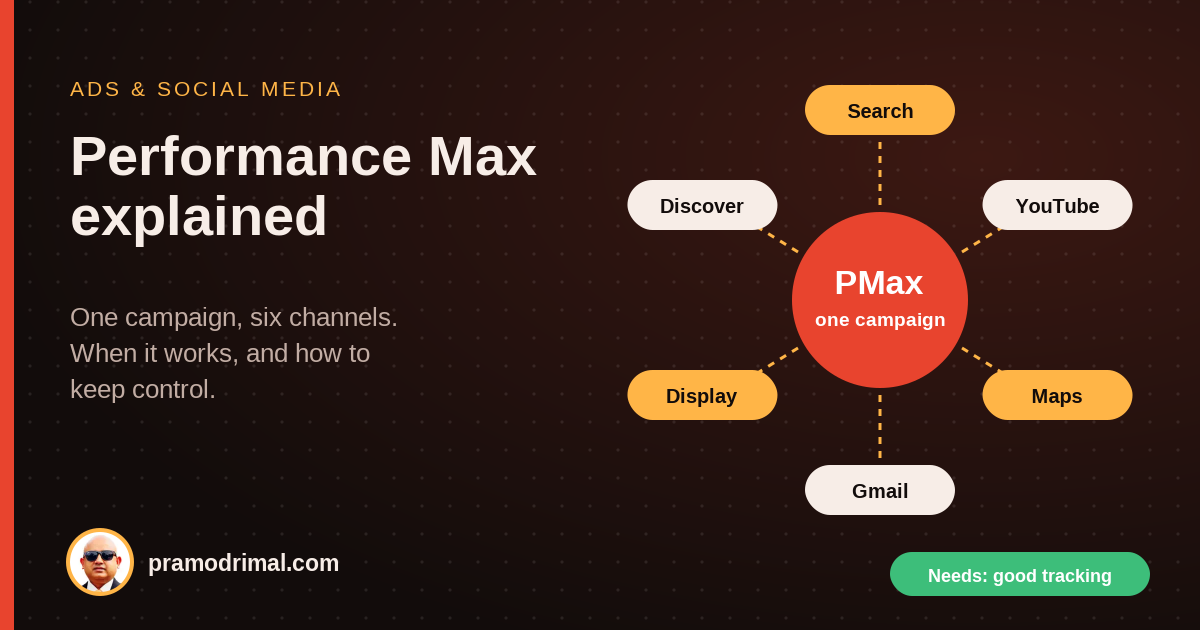
Quick answer Performance Max (often shortened to PMax) is a type of Google Ads campaign where you give Google a goal, a budget and a set of ads, and Google's AI decides where to show them. One campaign can reach Search, YouTube, Display, Discover, Gmail and Maps [1]. It can work very well when your conversion tracking is solid and you feed it good material. It can waste money when tracking is weak or when you can't see where the budget goes. This guide explains how it works, when to use it, and the controls that keep it honest.
Key takeaways
- Performance Max is a goal-based campaign that can use all Google Ads inventory from one campaign [1].
- It is built for clear conversion goals such as online sales or leads [1]. Without tracking, spend may be limited [2].
- New campaigns usually need 1–2 weeks to learn, sometimes up to 6 weeks [2]. Don't judge it in the first few days.
- Exact match Search keywords take priority over Performance Max for the same search [1], so the two can work side by side.
- You still have controls: negative keywords, brand exclusions, search themes and URL exclusions [5].
- The channel performance report shows how results split across Search, YouTube, Maps and the rest [9].
What is Performance Max, in simple words?
Imagine hiring a very fast assistant who can put your ads in six different shops at once. You tell the assistant what a good result looks like (a sale or an enquiry), how much you can spend, and give them your best photos, videos and wording. The assistant then tries thousands of combinations and places, and keeps doing more of what brings results.
That assistant is Performance Max. Google describes it as a "goal-based campaign type" that gives access to all Google Ads inventory, including YouTube, Display, Search, Discover, Gmail and Maps, from a single campaign [1].
How is it different from a normal Search campaign?
| Search campaign | Performance Max | |
|---|---|---|
| Where ads show | Google search results (and search partners if on) | Search, YouTube, Display, Discover, Gmail, Maps [1] |
| How you target | Keywords you choose | Google's AI, guided by your goals, assets, audience signals and search themes |
| Ad formats | Text ads | Text, images, logos and video, mixed automatically |
| Control | High: you see each keyword and search | Lower: fewer levers, more automation |
| Best for | Clear searches you know you want | Reaching more people when tracking is strong |
If you are new to Google Ads, start with my Google Ads beginner's guide, which explains the auction, Quality Score and budgets.
When does Performance Max work well?
Google recommends Performance Max when you have specific conversion goals, such as increasing online sales or generating leads [1]. In practice it tends to suit you when:
- Your conversion tracking is accurate. PMax learns from conversions. If it counts the wrong things, it chases the wrong people. My Google Ads audit checklist shows how to check tracking first.
- You have enough conversions. Smart Bidding works best with data; Google suggests measuring over periods with at least 30 conversions (50 for Target ROAS) [10].
- You have good creative. Clear photos, a logo, short videos and strong headlines give the AI more to work with.
- You sell online or want leads across many channels. Online stores with a product feed and service businesses with a steady lead flow often see the most benefit.
- You can wait for it to learn. Learning usually takes 1–2 weeks and sometimes up to 6 [2].
When is Performance Max a bad idea?
- No reliable tracking. You can create a campaign without conversion tracking, but Google says spend may be limited [2], and you won't know what it achieved.
- Very small budgets. With little budget spread across six channels, it can take a long time to learn anything.
- You need tight control over every search. If you only want to pay for "emergency plumber Adelaide" and nothing else, a well-built Search campaign is clearer.
- Poor landing pages. PMax sends people to your site. If the page is slow or confusing, more traffic just means more waste.
- You can't review it regularly. Automated does not mean unattended.
| Your situation | Start with |
|---|---|
| New business, small budget, urgent local service | Search campaign with phrase and exact match |
| Search campaign converting well, want more reach | Add Performance Max alongside it |
| Online store with product feed and sales tracking | Performance Max (often with Search for brand) |
| No conversion tracking yet | Fix tracking first, then decide |
How does Performance Max decide where to show ads?
You don't pick keywords. You give the campaign "inputs", and Google's AI uses them to find people likely to convert.
1. Goals and bidding
You choose a goal such as Sales or Leads [1] and a bid strategy. Smart Bidding strategies include Target CPA, Target ROAS, Maximise conversions and Maximise conversion value, and they need conversion tracking [10]. Google warns against overly restrictive Target CPA or Target ROAS settings, because they can limit reach [2].
2. Asset groups (your ad materials)
An asset group is a bundle of text, images, logos and videos for one theme, such as one product range or one service. Google's limits include [3]:
| Asset | Limit or recommendation |
|---|---|
| Headlines | Up to 30 characters; 11+ recommended (minimum 3, maximum 15) |
| Long headlines | Up to 90 characters; 2+ recommended (minimum 1, maximum 5) |
| Descriptions | Up to 90 characters; 4+ recommended (minimum 2, maximum 5) |
| Business name | Up to 25 characters |
| Landscape image | 1.91:1, 1200 × 628 recommended |
| Square image | 1:1, 1200 × 1200 recommended |
| Logo | 1:1, 1200 × 1200 recommended |
| Video | 10–60 seconds; horizontal, vertical or square |
If you don't upload a video, Google may create one from your images [3]. Those automatic videos are rarely as good as a simple one you make yourself, so add your own where you can.
Tip: make one asset group per service or product range, not one giant group for everything. "Hot water systems" and "blocked drains" need different images and wording.
3. Audience signals and search themes
Audience signals tell the AI who your customers are, for example people who visited your site or your customer list. Search themes are words and phrases you know matter, which give "a broader signal to Google's AI" [6]. Google allows up to 50 search themes and suggests broad themes ("running shoes") rather than very narrow ones, avoiding duplicates and close variants [6]. Search themes carry the same priority as phrase and broad match keywords [1].
4. How it works alongside Search campaigns
If a search matches an exact match keyword in one of your Search campaigns, that Search campaign takes priority over Performance Max [1]. This is useful: keep your most important, proven searches in a Search campaign with exact match, and let PMax look for extra customers elsewhere.
The controls you still have
Automation doesn't mean you lose all control. Google lists keywordless targeting, Final URL expansion, search themes, negative keywords and brand exclusions as the Search controls for Performance Max [5].
Negative keywords. You can block irrelevant or brand-unsafe terms. Google calls this a highly restrictive control that can harm performance, and suggests using it only for essential brand safety or completely irrelevant terms [4]. For a local business, "jobs", "free" and "DIY" style terms are often reasonable candidates.
Brand exclusions. If someone searches your business name, they were probably going to find you anyway. Brand exclusions stop Performance Max showing on searches for your brand, its common misspellings and related brands, on both Search and Shopping ads [7]. Google recommends this when you manage brand traffic in a separate campaign [7]. Without it, PMax can look great on paper simply by taking credit for people who already knew you.
Final URL expansion and URL exclusions. With Final URL expansion on, Google may send people to a different page on your site that it thinks matches the search better, and may write a matching headline [8]. You can exclude pages such as About Us, careers, privacy policy or out-of-stock products [8], and rules such as "URL contains /blog" [8]. You also remain responsible for checking that landing page content is accurate [1].
| Control | Use it to | Watch out |
|---|---|---|
| Brand exclusions | Stop paying PMax for your own brand searches | Run a separate brand Search campaign so you still show |
| Negative keywords | Block clearly irrelevant or unsafe searches | Google says it can restrict performance [4] |
| URL exclusions | Keep traffic off pages that don't sell | Only available when Final URL expansion is on [8] |
| Search themes | Point the AI toward what matters | Use broad, distinct themes [6] |
How do you check if it's working?
Give it time
For new campaigns, data takes 24–48 hours to appear and ads take 1–2 days to be reviewed [2]. The learning phase is typically 1–2 weeks, sometimes up to 6 [2]. Avoid big changes during that time.
Read the channel performance report
The channel performance report shows how Performance Max delivers results across Google Search, Display, YouTube, Discover, Maps, Gmail and search partners [9]. It includes cost, conversions and conversion value [9]. Look for a channel that takes a lot of money but brings few conversions. That is a sign your assets or goals need work. Note that this data is available from 6 June 2025 onwards [9].
Check lead quality, not just numbers
Performance Max can find cheap "conversions" that are not real customers, such as spam form fills. Send every lead into a CRM and mark which ones became jobs. My CRM comparison and n8n vs Make vs Zapier guide explain how to set that up. Over time you can feed only qualified leads back as conversions, so the AI learns from real customers.
A simple Performance Max launch checklist
- Conversion tracking tested, with only real leads or sales as primary goals (see the audit checklist).
- A brand Search campaign running, and brand exclusions added to Performance Max.
- One asset group per service or product range.
- At least 11 headlines, 2 long headlines, 4 descriptions, square and landscape images, a logo and your own short video [3].
- Audience signals: website visitors and customer list, if you have them.
- A handful of broad, distinct search themes [6].
- URL exclusions for pages that don't sell [8].
- A budget you can hold steady for at least 4–6 weeks.
- A weekly look at the channel performance report and lead quality.
How Performance Max fits with the rest of your marketing
Performance Max shows ads in Maps, so a complete Google Business Profile helps; see my Google Business Profile checklist. It also brings visitors at all hours, so an after-hours assistant can catch enquiries; see does a small business need an AI chatbot?. And because Google's search results now include AI answers too, your free visibility matters as much as paid; my guide on getting cited in Google AI Overviews covers that side.
Want a second opinion before you switch on Performance Max, or help fixing one that is spending without results? See Google and Meta Ads management or book a free chat.
FAQ
Is Performance Max good for small businesses?
It can be, when conversion tracking is accurate, there are enough conversions to learn from, and you supply good images and video. With no tracking or a tiny budget, a Search campaign is usually safer.
How long does Performance Max take to work?
Google says the learning phase is typically 1–2 weeks and sometimes up to 6 weeks [2].
Does Performance Max replace Search campaigns?
No. Exact match keywords in Search campaigns take priority over Performance Max for the same search [1], so many accounts run both.
Can I see which searches Performance Max showed for?
You get less detail than in Search campaigns, but you can steer it with search themes, negative keywords and brand exclusions [5], and see results by channel in the channel performance report [9].
Should I stop Performance Max showing for my business name?
Usually yes. Brand exclusions stop it showing for your brand and its misspellings [7]. Cover your brand with a separate Search campaign instead.
Do I need videos?
Videos of 10–60 seconds are supported [3]. If you don't add one, Google may generate one [3], so a simple video of your own usually works better.
References
- Google, "About Performance Max campaigns", Google Ads Help, 2026. https://support.google.com/google-ads/answer/10724817?hl=en
- Google, "Create a Performance Max campaign", Google Ads Help, 2026. https://support.google.com/google-ads/answer/10724896?hl=en
- Google, "How asset groups work", Google Ads Help, 2026. https://support.google.com/google-ads/answer/10724748?hl=en
- Google, "About negative keywords" (Performance Max), Google Ads Help, 2026. https://support.google.com/google-ads/answer/16668865?hl=en
- Google, "Search targeting & controls for Performance Max", Google Ads Help, 2026. https://support.google.com/google-ads/answer/16672776?hl=en
- Google, "About search themes", Google Ads Help, 2026. https://support.google.com/google-ads/answer/16669486?hl=en
- Google, "About brand exclusions", Google Ads Help, 2026. https://support.google.com/google-ads/answer/16669487?hl=en
- Google, "About Final URL expansion (asset optimization)", Google Ads Help, 2026. https://support.google.com/google-ads/answer/16672777?hl=en
- Google, "About the channel performance report", Google Ads Help, 2026. https://support.google.com/google-ads/answer/16260130?hl=en
- Google, "About Smart Bidding", Google Ads Help, 2026. https://support.google.com/google-ads/answer/7065882?hl=en